I proposed, built, and maintained the only logged out accessible tooling suite in Meta - which I’ve conveniently called “Logged Out Internal Settings” (hereafter as LOIS). This toolset is still used daily today by employees though it’s no longer as well maintained since I left the company earlier last year.
This is part of a series (Project Presentation) where I share stories of my past projects.
Background #
At this point, we were still building out a brand new set of access flow that unifies the experience (for login, account recovery, registration) across Facebook, Instagram, and Messenger on both iOS and Android. Since the whole thing was internal anyway, people were littering internal-only information everywhere for easier debugging and faster development cycle. Between all that, I built a small tool on the landing page that let engineers quickly switch between different dev pods or prod, and another prototyping tool that lets you add any random UI for quick testing. As we got closer to release, I began thinking how to make this “launch safe”.
Problem #
On a basic level, I set up a simple gating where you can only access all the internal-only stuff if you’re already connected to a dev pod. It works fine from a security perspective since there are a bunch of different checks you need to pass before you can be connected to dev pods. But this severely limited the exposure of it since employees not already connected to a dev pod can’t easily utilize the tool to switch into one.
| Scenario | Before | After |
|---|---|---|
| prod -> dev pod | ✅ | ❌ |
| switch dev pod | ✅ | ✅ |
| dev pod -> prod | ✅ | ✅ |
I thought this wasn’t an ideal setup because:
- prod -> dev pod was one of the most popular use cases
- dev pods are generally slower so other tools should ideally still work without it
But the main problem was that all these need to exist before you login to the app so we can’t tell exactly if the user is an employee (or not).
Ideation #
I started with a simple security layer idea like this. Not everything is “super sensitive” and requires the highest level of security check to be accessible. Something like “show debug info” that prints out information about the device / app isn’t exactly sensitive while still extremely valuable for debugging. (Keeping it away from showing to users prevents unnecessary confusion.) This also allows for progressive increments in security access pass to gain more access. For eg. you need to be on corpnet / VPN to access the dev pod connector; once connected, you’re now “promoted” to dev pod access level.
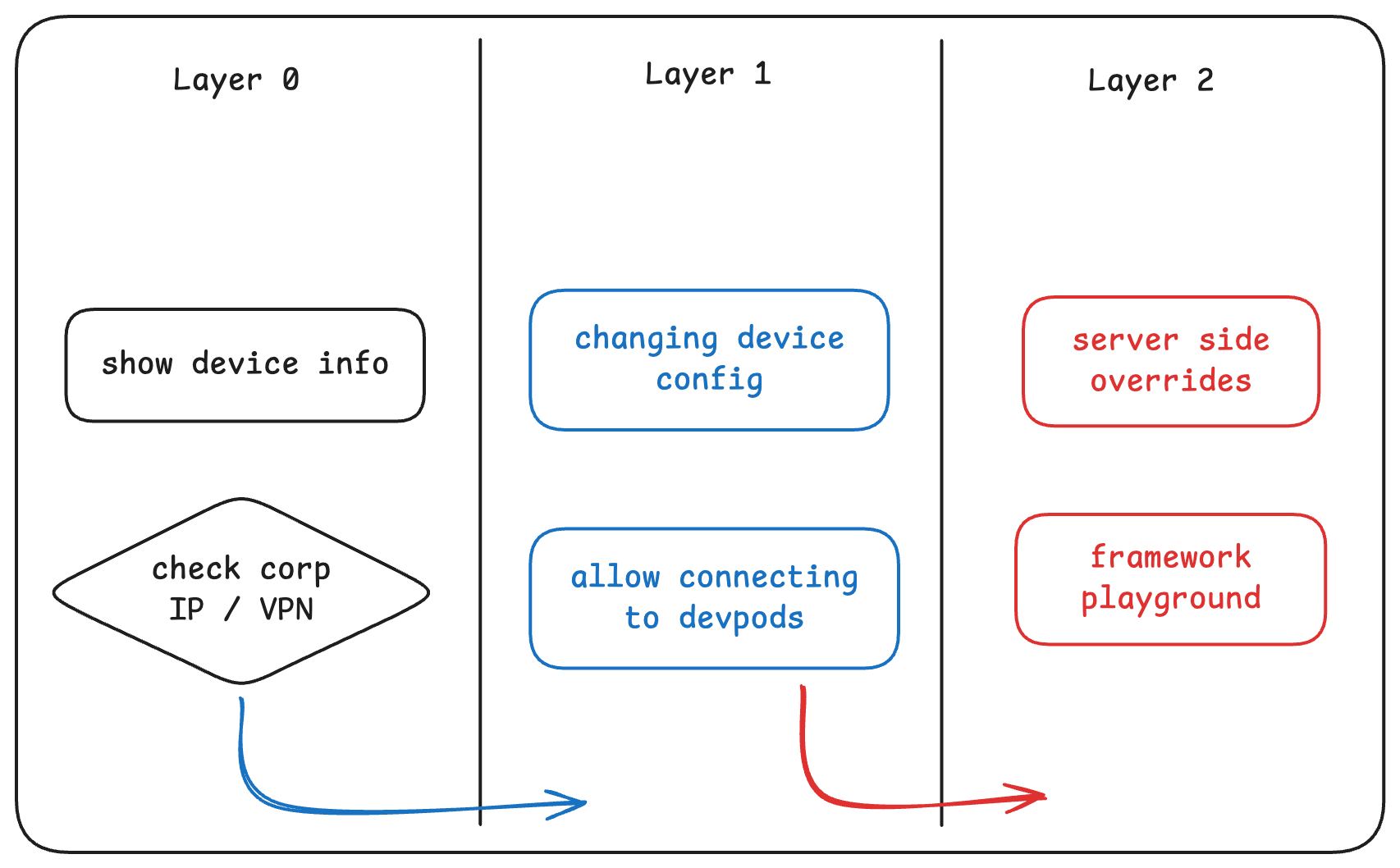
At this point, I started thinking of an alternative to “dev pods” for the highest level access. Some job functions (like QA, design) can benefit from this tool as well but they don’t usually have access to a dev pod. I quietly put together an idea for an access flow similar to how TOTP works. I call this the “Employee Authenticator”. More on this later.
Security #
I found an internal discussion group on general security stuff and asked a few clarifying questions surrounding how each of these checks can / should work and what potential risks it can carry. This helps me validate the idea while also learning about some weird past incidents. Apparently there was once an incident where a public coffee shop Wi-Fi below SF Meta office was falsely flagged as corpnet because some employee gave them the wrong router for setup.
Anyway, after gathering good context and information around it, I filed for a formal security review. The review went smoothly as we received the green light to proceed.
Opportunity #
Our org decided to host its first (rolling?) hackathon where you can form teams and build things (that you wouldn’t otherwise work on) over a given week. I polished up my proposal doc for Employee Authenticator then recruited a few engineers around me to help build it.
Here’s how it works:
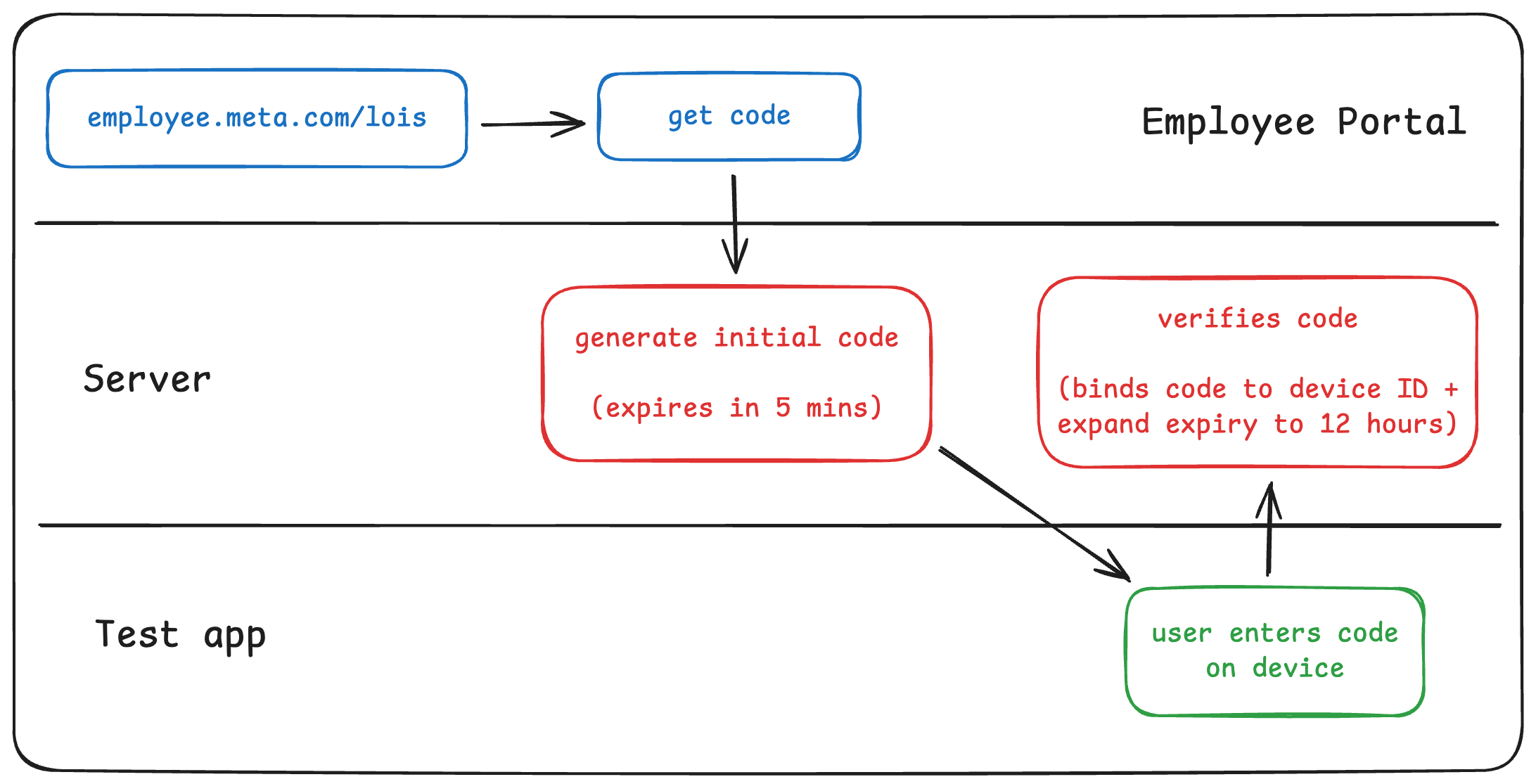
While we didn’t win anything from the hackathon, it helped kickstart development of this tooling with the idea that LOIS isn’t just for devs, but also for non-devs. I had to later get it re-reviewed because some roles (like QA) are mostly filled by “Contingent Workers” who can’t be classified as employees legally(?) so I also had it renamed to “Internal Authenticator”.
Note: I never got through with this process entirely so if you’re a Meta employee looking at LOIS Authenticator, it’s likely all over the place since no one really took over ownership of LOIS after I left.
Follow-ups #
As I’ve mentioned at the beginning, some of these internal features already existed but they had no protection and we needed to secure them before we began testing the new flow publicly. One of the minor but important tweaks I made was to add a text label on the menu screen saying “connect to {corpnet / VPN | dev pod} to access more features”. Since engineers who’ve been working on this flow have been using these underlying features day-in-day-out, suddenly seeing them go missing can be a bit confusing. That small text saved countless hours of “Hey BinHong, I don’t see X feature anymore in LOIS.” while quickly nudging them towards the right direction to self-unblock.
Takeaways #
This is an example project where I should have advocated harder for myself to gain better visibility within my org (where my performance review is done). While security teams were happy with our collaborations and many engineers (both within and outside of the org) benefitted greatly from the continued existence of LOIS, I doubt many in the management rank understood the importance of the work and underlying value it provides to engineers. From the users’ (employees’) perspective, I added some layer of friction to access the same tooling; while the value it adds was to ensure we can keep this set of tooling post-public-launch.
The other interesting side effect of the security layer was that it helped build a proper structure around the entire LOIS system. This paved the way for an eventual platformization allowing for each team to build customized toolings into LOIS.